Approve the week without rubber-stamping it.
Timesheets and approvals· Included in every plan
ONYX1 reads every shift as it lands and marks the sheets worth opening. The clean ones go through in one tap. 23 rules do the looking, and not one of them decides what anyone gets paid.
- 23
- Rules read every shift
- 0
- Decide anyone's pay
- 1 click
- To the payroll file
- NZ + AU
- Pay periods and rules
Friday night, and the sheets are in.
You have two options, and you already know both of them.
Option one
Approve the lot
Two minutes, and you have just paid for a shift nobody clocked out of, a line the office typed onto somebody else’s sheet, and a start recorded four kilometres from the job.
Option two
Read every line
Your evening, every week, checking a hundred lines to find the three worth a question. The other ninety-seven were always fine.
Neither is a good answer. So ONYX1 does the reading, and tells you which sheets to open.
A flag means look. A note means carry on.
Every rule is sorted by one honest question: would a person who did everything right trigger it? If yes, it is a note, and it never counts against anybody.
Flag
11The sheet steps out of the bulk-approve button. Open it, read one sentence, decide. That is ONYX1 saying look at this one, which is not the same as deciding anything.
Note
9Shown on the sheet where you can see it, counted against nobody, holding nothing up. A night shift crossing midnight is not a problem, it is just worth knowing.
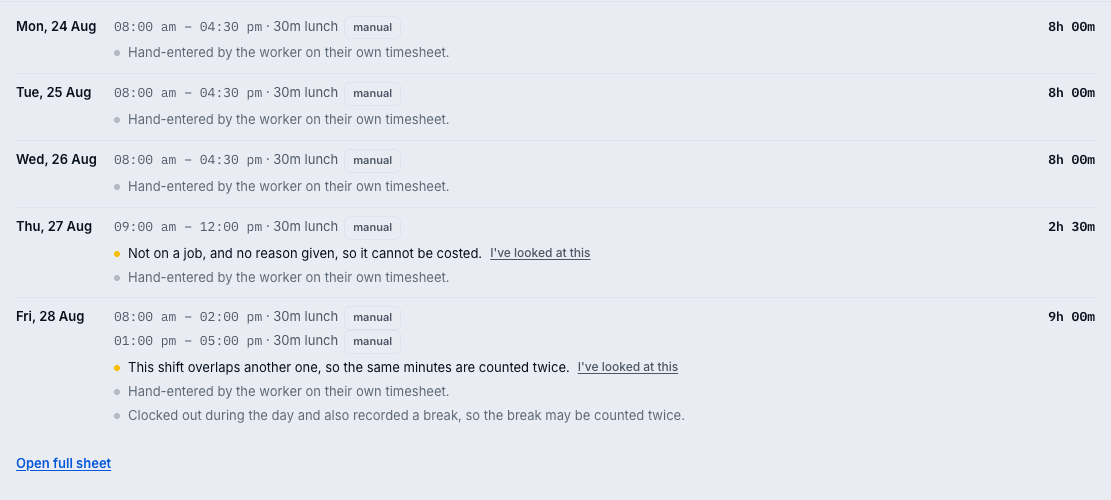
What they actually say on the sheet
- FlagThe system closed this shift. Nobody watched it end, so the finish time is a guess.
- NoteThis shift ran past midnight. It bills to the day it started.
- FlagThis shift overlaps another one, so the same minutes are counted twice.
- FlagClocked in about 4.2 km from the site.
- FlagHand-entered onto this timesheet by somebody else.
- FlagChanged more than a day later, and the hours went up from 7.5h to 9.0h.
- Note10.5h across the day, every shift clocked in and out.
- CrewThe crew's times on this job split: 8.0h vs 9.5h vs 6.0h. Nobody is clearly the odd one out.
Eight of 23. The full list is in the docs, with what each one means and why it lands where it does.
Nothing here decides what anyone is paid.
No rule docks an hour. No rule rounds a shift down. No rule refuses an approval. ONYX1 reads the data and writes a sentence; you read the sentence and make the call. As long as somebody is clocking in and clocking out, there is nothing here to answer for.
Decided once. Recorded for good.
Draft, submitted, approved, and a register you can drill into whenever somebody asks what happened back in August.
Frozen at approval
What you saw is stored with your decision, so a job renamed next month cannot make a new flag appear on a sheet you signed off in August.
Explain once, and it is gone
“Clocked in at the yard, drove out after” is a legitimate answer. Record it and the sheet clears, for good. Nobody gets asked twice.
Rates frozen at clock-in
Cost and charge stamped on the shift as it starts, so a pay rise in October never rewrites what August cost you.
Nobody signs off their own
Enforced in the database, not in a policy document. A lone owner is the one exception, and the payroll report names those sheets.
It chases the week so you do not.
Still on site?
A shift left running gets a prompt on the phone, before it becomes a problem you find on Friday.
Runaway timers close themselves
Measured on hours elapsed, not the calendar, so a genuine 10pm to 6am night shift survives untouched.
The week hands itself in
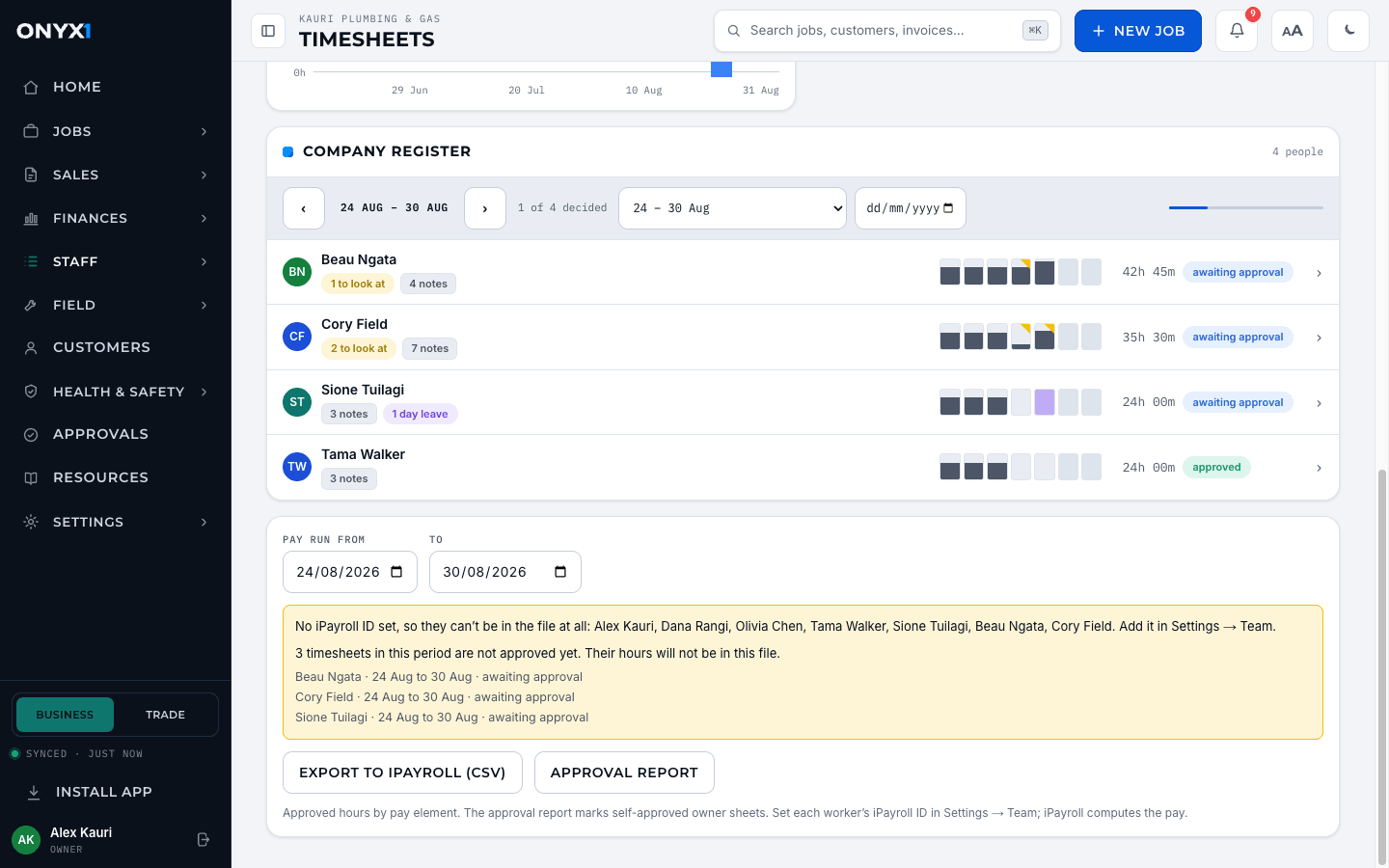
Unfinished sheets auto-submit after a grace window you set. Nobody's forgetfulness holds up the pay run.
The Friday nudge
Three in the afternoon on the last Friday of the period, anyone with an empty week gets a reminder.
Then the week goes straight to payroll.
Weekly or fortnightly
Approve weekly and pay fortnightly if that is how your shop runs.
Hours, not money
Approved minutes leave split into ordinary, overtime and penal. iPayroll computes the pay; ONYX1 does not.
Named before you export
The screen names who will not be in the file and why, before you download it rather than when a pay packet is short.
NZ dates, DST handled
It sounds like a detail until a pay run lands an hour into the wrong day.
Get your Friday night back.
Start a free trial, have the crew clock in from the job, and let next week's timesheets tell you which ones need you.
You create your account on onyx1.app. Fourteen days free, the full Pro feature set, no credit card.